
Tideways 2026.3 Release
Product
This Release introduces AI Performance Insights, expanding the Tideways CLI with access to monitoring, exception tracking, Slow SQL, and trace data for agentic performance analysis.
We added PHP 8.6 compatibility and improved trace views and instrumentation.
We’ve also added a broad range of new framework- and ORM-specific bottleneck detections for Shopware, Magento, Laravel, Symfony, and Doctrine. Instead of only showing where time is spent, Tideways identifies common performance anti-patterns and configuration issues, helping you pinpoint optimization opportunities faster with actionable recommendations.
Summary
- Performance Insights for AI Agents
- Dark Mode
- Ready for PHP 8.6
- Improved Trace Truncation in Timeline
- Shopware Feature Flag Detection
- Sleep Span Detection
- Delivery Stats for Integrations
- Copy Trace Data in UI to Clipboard
- Release Comparison: Average Total and PHP Response Added
- New Detected Bottlenecks
Performance Insights for AI Agents
Tideways launched support for running agentic performance optimization workflows from within Codex, Claude Code, or other agents.
The latest version of the tideways CLI now has subcommands that provide access to detailed trace, monitoring, exception tracking, and slow SQL data.
Integrated with a coding agent, this allows for high-level to code-level performance analysis and exploration by an AI agent.
After installing the CLI, do the following to get started:
- For now, this feature is still behind an organization-level feature flag: Go to the “Beta Features” section in your organization settings dialog to enable it.
- Run
tideways initin the project where you will launch Claude Code or Codex. This sets up a new.tideways.jsonconfiguration file in your project and skills to use. - Launch Claude Code or Codex.
- Use prompts similar to these to get started:
Analyze the performance of <URL> and offer improvement suggestions.See the performance data of <TIDEWAYS-TRACE-URL> and suggest improvements.Suggest a fix for <URL TO TIDEWAYS ERROR>See this video for a demonstration:
Dark Mode
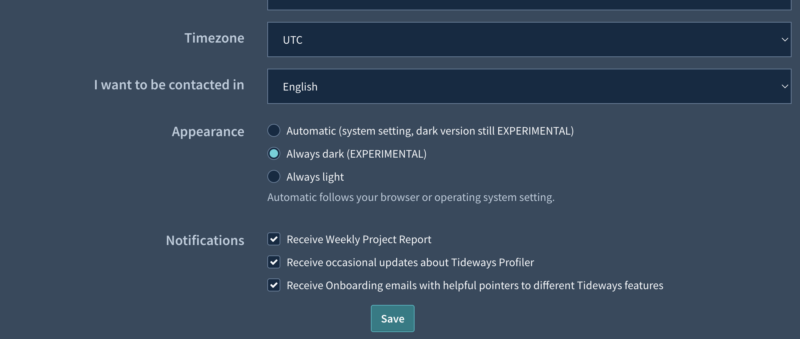
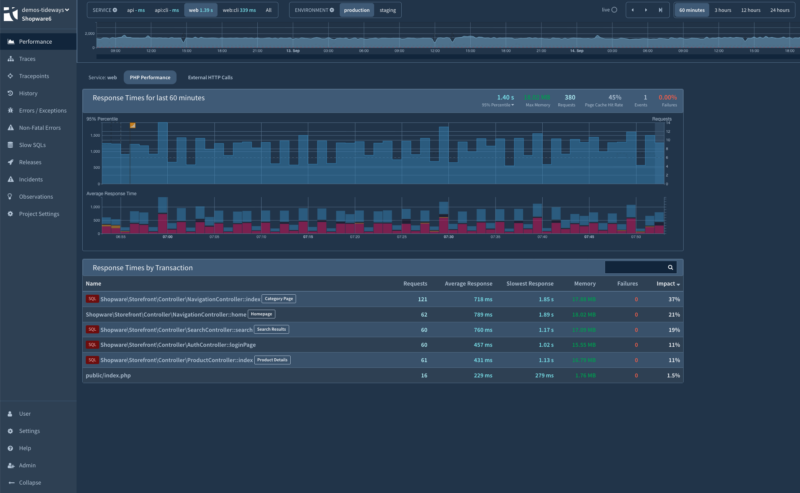
Tideways now includes an experimental dark mode to accommodate users in low-light environments or those who just prefer a dark theme over our default light one.
By default, all users remain on our light theme, but you can enable the dark theme under ‘User’ → ‘Account & Settings’ → ‘Appearance’ (https://app.tideways.io/settings/profile)
The dark theme is still in an experimental stage. All major modules of our application have been tested, but some visual inconsistencies may remain. We welcome your feedback as we continue refining colors, contrast, and individual components.
Ready for PHP 8.6
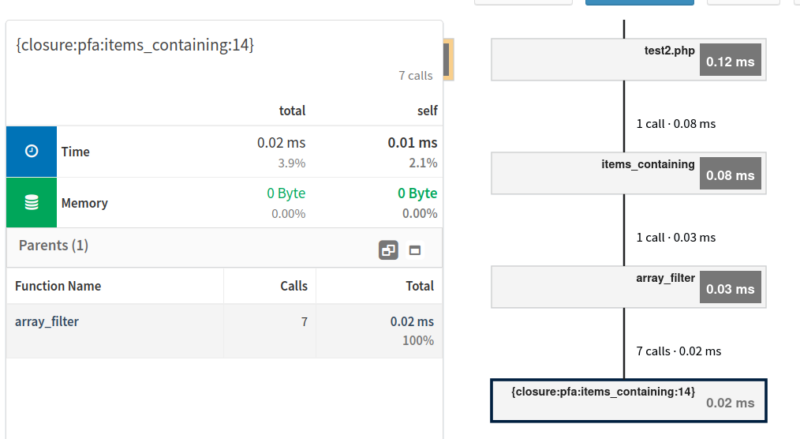
With the first Alpha release of PHP 8.6 in early July, we started testing and adjusting Tideways to fix any incompatibilities and support the new features, such as partial function application. We expect to be able to provide a Tideways Extension update with Beta support for PHP 8.6 shortly after the release of PHP 8.6 RC 1 on September 24, which freezes PHP’s internal API.
Improved Trace Truncation in Timeline
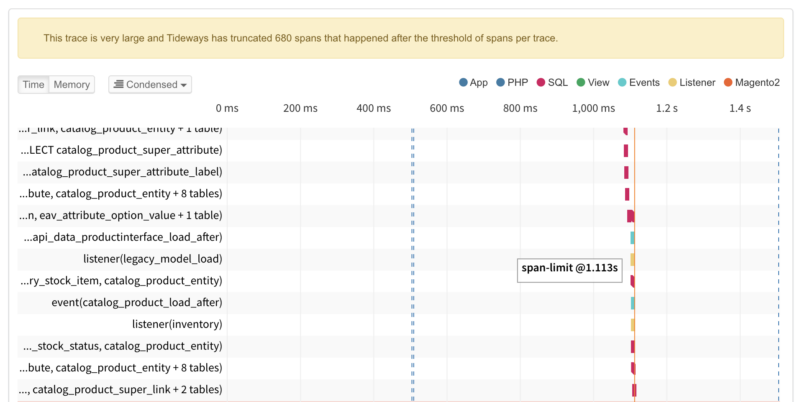
When a trace exceeds the span limit, Tideways now preserves the beginning of the trace instead of the end. Since traces exceeding the span limit are likely to perform repetitive work after an initial set-up phase, this will result in this kind of trace being more insightful by including the set-up phase spans rather than repeated patterns during the working phase.
Shopware Feature Flag Detection
Tideways now collects Shopware’s feature flags as an annotation, allowing bottlenecks to advise on feature flags, such as a CACHE_REWORK and improving diagnostics, and aggregated performance analysis.
Sleep Span Detection
Traces now include spans for sleep() and usleep() calls of 100 ms or longer, making intentional pauses easier to identify during performance analysis.

Delivery Stats for Integrations

The integration settings screen now shows delivery statistics for the last 30 days, including the success rate and latest delivery. This makes it easier to verify that notifications are reaching their destination and quickly spot integration issues.
Copy Trace Data in UI to Clipboard
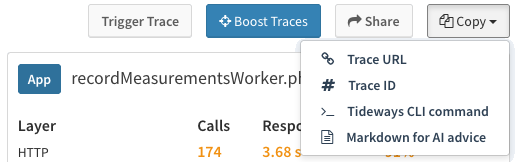
Trace details now include a copy menu for the trace URL, trace ID, Tideways CLI command, and Markdown, making it easier to continue investigations in the CLI or share trace context with the agent of your choice.
Changelog: New trace copy options.
Release Comparison: Average Total and PHP Response Added
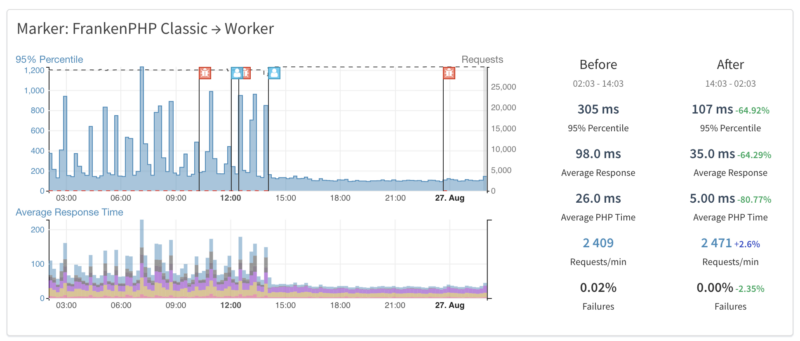
On a release comparison screen, you now get the comparison of Average Total Response Time and Average PHP Time in addition to the comparison of the 95t% percentile response time.
New Detected Bottlenecks
Tideways now automatically detects additional performance bottlenecks across Shopware, Magento, Symfony, Laravel, and Doctrine, helping you uncover framework- and ORM-specific optimization opportunities.
Shopware
Shopware has an extensive guide of performance tweaks, but not every optimization is relevant for every store. Tideways analyzes your application and highlights the tweaks that actually have a measurable impact on your specific Shopware installation.
Slow Third-Party Subscriber
Identify third-party event subscribers that consume a disproportionate share of request time, making slow plugins easier to pinpoint.
Cart Processing Slow
Highlights slow Shopware cart processing and identifies the processors with the greatest performance impact.
Use Redis with Shopware Delayed Cache Invalidation
Shopware 6.7+ stores delayed cache invalidation in MySQL by default, which can become a bottleneck under load. Tideways recommends switching to Redis when this pattern is detected.
Use Redis for Cart in Shopware 6
Detects slow MySQL cart writes and recommends Redis cart storage to reduce write overhead and improve request performance.
Discourage Mail Data Updates in Checkout
Identifies slow mail data updates during checkout requests and recommends disabling automatic mail variable updates to reduce database contention under load.
Use Redis for Increment Storage
Highlights MySQL lock contention caused by Shopware increment storage and recommends Redis or disabling persistent tracking where appropriate.
Magento
Slow Third-Party Magento View Blocks
Find slow third-party Magento view blocks based on their self time to identify extensions that significantly impact page rendering.
Slow Magento Quote Observer Can Be Replaced
Identifies slow executions of Magento’s default CheckExpirePersistentQuoteObserver and recommends the optimized replacement where applicable.
Symfony
Symfony Config: Missing Config Cache
Highlights configuration loading during requests, indicating that Symfony’s config cache is missing and avoidable runtime overhead is introduced.
Laravel
Writing to the Laravel Error Logs
Detects requests slowed down by excessive logging, including repeated deprecation warnings.
Creating Objects Through Laravel Container Has Significant Impact
Highlights excessive object creation through Laravel’s service container when it has a significant performance impact.
Laravel Session Garbage Collection Triggered and Slow
Detects slow session garbage collection and indicates when the session lottery frequency may be configured too aggressively.
Time Spent Building Eloquent Model
Identifies requests where Eloquent model creation and attribute processing consume a significant share of execution time, indicating opportunities to reduce object creation.
Doctrine
Doctrine ORM Inverse OneToOne Associations Eagerly Loaded
Highlights eager loading caused by inverse one-to-one associations or inheritance proxies, helping uncover hidden N+1 queries.
General
Functions Called Excessively
Spot functions that are called excessively and consume a significant share of execution time, helping uncover inefficient algorithms and reduce unnecessary function calls.
Geolocation API Used
Highlights expensive geolocation API calls that add noticeable latency to user requests.
With this Release, we’ve made it easier to explore performance data through AI coding agents, continued work on PHP 8.6 compatibility, and broadened automatic bottleneck detection across popular PHP frameworks and ORMs to make PHP performance less of a head-scratcher.
About the author

I’m a Content and Marketing Manager at Tideways, where I focus on content marketing, community building, and developer-focused communication. I enjoy turning complex technical topics into engaging content and creating meaningful connections within the PHP ecosystem.
As a passionate content creator and published author, I believe that great content starts with curiosity, authentic stories, and a genuine interest in the people behind them. Whether I’m working on marketing campaigns, building communities, or writing, I enjoy thinking outside the box and finding creative ways to engage and inspire others.