
Shopware 6: MySQL vs OpenSearch
PHP Performance
Fast loading times improve the shopping experience and increase customer satisfaction. For category navigation and product search, adding OpenSearch/Elasticsearch to the tech stack can perform better than with just MySQL/MariaDB. The key question is: at what point does it actually make sense to make the switch?
Adding a secondary search engine has the downside of additional infrastructure costs and operational complexity. So understanding why Shopware 6 recommends this by looking at the performance impact and understanding the bottleneck behind it is important.
In this blog post, we’ll explore how these engines handle category navigation and search, compare their performance using real benchmarks, and help you understand which solution makes the most sense for your Shopware project.
Methodology
To keep the comparison as fair as possible, we set up two vanilla Shopware 6 instances. One is using MySQL/MariaDB for category navigation and search; another is using OpenSearch/Elasticsearch.
Both instances used a catalog containing 100,000 products across 5,000 categories.
We measured storefront server response times in three scenarios:
- Category pages without filters.
- Category pages with filters applied.
- Search result pages without filters.
For the category benchmarks, we varied the number of products assigned to a category, from 1,000 to 100,000.
Software version:
| Software | Version |
|---|---|
| Shopware | 6.7.15.1 |
| PHP | 8.5 |
| MariaDB | 11.4 |
| OpenSearch | 3 |
Important: All results shown below are based on an uncached single request, without any significant traffic load. Since each Shopware instance experiences different levels of customer traffic (high, medium, or low), the simplest and most consistent approach is to test one request at a time.

MySQL/MariaDB – Great for small catalogs, but what happens as they grow?
MySQL/MariaDB is the default engine for category navigation and product search in Shopware 6. And for smaller catalogs, it works pretty well.
However, as the catalog grows in size and complexity, things can start to slow down. More products, more categories, more filters, and more relationships mean more work for the database. In our benchmarks, this became particularly noticeable with categories containing tens of thousands of products.
Why does it get slower?
There are several reasons, but one of the most important is how relational databases retrieve data. In Shopware, product information is spread across multiple tables. To find the products that belong to a category or search, the database may need to work with relationships involving:
- Product parents and variants.
- Category assignments.
- Product visibility.
- Translations.
- Properties and filters.
Depending on the query, MySQL/MariaDB needs to join tables, evaluate conditions, and process large sets of records before returning the results.
Joins aren’t inherently slow. In fact, relational databases are highly optimized for them. The challenge comes when queries need to process large numbers of records, especially when multiple joins, filters, sorting operations, and aggregations are involved. Even with proper indexes, the amount of work can increase significantly as the catalog grows.
On top of that, Shopware still has to process the returned data, including decoding certain fields (like JSON strings) to hydrate the corresponding PHP objects. All of this contributes to the total server response time.
MariaDB Benchmark: Category navigation without filters
Here’s what happened as we increased the number of products assigned to a category:
| Products in category | Server response time |
|---|---|
| 1.000 | 232 ms |
| 10.000 | 492 ms |
| 25.000 | 1.538 ms |
| 50.000 | 6.837 ms |
| 100.000 | 14.686 ms |
With 1,000 products, the server responded in just 232 ms.
But with 100,000 products, the same type of page took 14,686 ms; that’s over 63 times slower.
And remember, we’re talking about a vanilla Shopware installation. Real-world shops often have additional plugins, customizations, and integrations that can introduce even more overhead.
What about category filters?
Filtering is another important part of the shopping experience. Customers expect to narrow down products by color, manufacturer, price, and other properties without waiting several seconds for the page to reload.
We tested the same category containing 100,000 products, this time applying different filters.
| Filter | Matching products | Server response time |
|---|---|---|
| None | 100.000 | 14.686 ms |
| Color = Black | 16.502 | 14.935 ms |
| Manufacturer | 1.652 | 13.839 ms |
| Combined filters | 279 | 12.951 ms |
| Price ≤ 1.000 | 93.913 | 14.081 ms |
Here’s something interesting: fewer matching products don’t necessarily mean faster queries.
For example, the combined filters returned only 279 matching products, yet the server still took 12,951 ms to respond.
Because the database doesn’t simply retrieve the final matching products. It first needs to evaluate the filter conditions, potentially across multiple tables, and perform the necessary operations to determine which products match. Some filters can actually make the query more expensive, even when the final result set is much smaller. This is an important distinction when optimizing Shopware category pages.
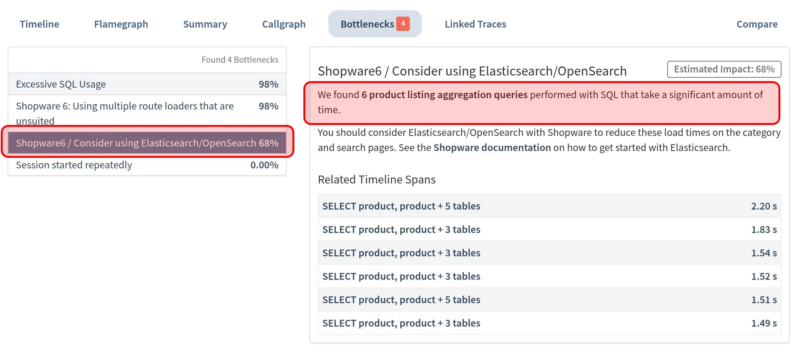
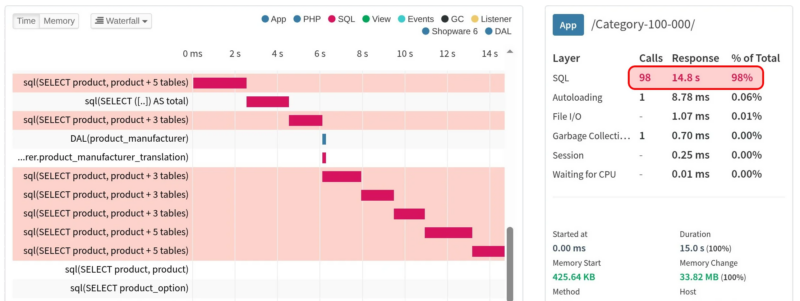
Tideways has a “Bottlenecks” section that highlights the most expensive queries, helping identify cases where OpenSearch/Elasticsearch could be a more compelling alternative. It identified six expensive aggregation queries that are negatively impacting MySQL/MariaDB performance.
OpenSearch/Elasticsearch: built for large catalogs
OpenSearch/Elasticsearch provide an alternative to database category navigation and product search in Shopware 6.
For smaller catalogs, the performance difference might be minimal. In some cases, the additional infrastructure and maintenance might not even be worth it. However, the results are significantly better for medium and large catalogs.
Why is OpenSearch/Elasticsearch faster?
The most significant difference lies in how the data is organized and searched.
The main difference between MySQL/MariaDB and OpenSearch/Elasticsearch is how they handle product searches. While MySQL/MariaDB relies on relational tables and joins, OpenSearch/Elasticsearch uses prebuilt, search-optimized documents and inverted indexes to find and filter products more efficiently. Although product updates may take a few seconds to become searchable and Shopware may still need additional database queries, this approach can significantly reduce database load and improve storefront performance.
OpenSearch Benchmark: Category navigation without filters
Let’s compare both engines using the same category sizes.
| Products in category | MariaDB | OpenSearch | Time saved | Speedup |
|---|---|---|---|---|
| 1.000 | 232 ms | 265 ms | −33 ms | 0,88× |
| 10.000 | 492 ms | 280 ms | 212 ms | 1,76× |
| 25.000 | 1.538 ms | 290 ms | 1.248 ms | 5,30× |
| 50.000 | 6.837 ms | 298 ms | 6.539 ms | 22,94× |
| 100.000 | 14.686 ms | 301 ms | 14.385 ms | 48,79× |
Now that’s a difference! With 1,000 products, OpenSearch/Elasticsearch was slightly slower. That’s barely noticeable. But as the category grew, the gap became much larger.
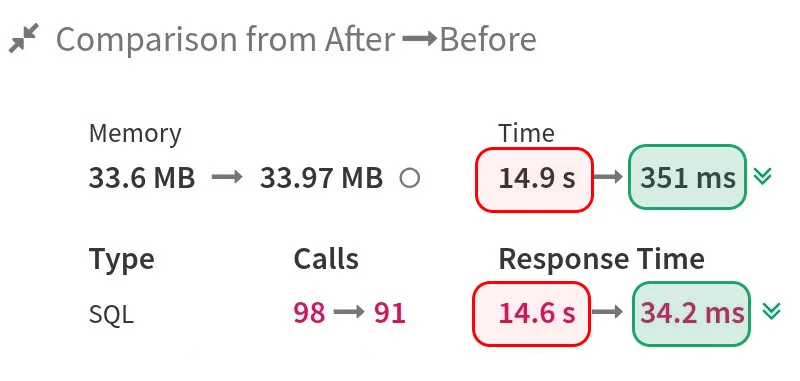
At 100,000 products, MySQL/MariaDB needed 14,686 ms, while OpenSearch/Elasticsearch completed the same page in just 301 ms.
That’s roughly 49 times faster, saving more than 14 seconds of server response time on a single request. Even more interesting is how consistent the OpenSearch/Elasticsearch results were. Across all tested category sizes, server response times remained around ~250 ms and ~300 ms.
In other words, while MySQL/MariaDB slowed down considerably as the category grew, OpenSearch/Elasticsearch maintained almost the same performance throughout our tests.
Benchmark: Search without filters performance
| Search term | MariaDB | OpenSearch | Speedup |
|---|---|---|---|
| black | 1.084 ms | 250 ms | 4,34× |
| laptop | 1.020 ms | 263 ms | 3,88× |
| sofa | 896 ms | 265 ms | 3,38× |
OpenSearch is ~3-4× faster for search.
Tideways: finding the real bottleneck
One of the most useful parts of this experiment wasn’t just measuring server response times. It was to understand what the time was actually spent on. That’s where Tideways came in. It allowed us to profile Shopware requests and investigate what happens behind the scenes.
Instead of simply knowing that a category page has a 14-second server response time, we can inspect the request and identify expensive operations.
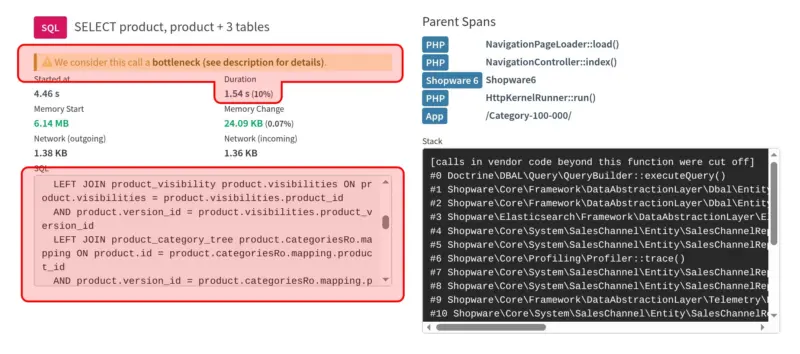
With MySQL/MariaDB-backed category navigation, we can directly see the SQL queries that compute the ranges and selectable values for all the filter options. Each query takes a significant amount of time.
Conclusion
So, is OpenSearch/Elasticsearch faster than MySQL/MariaDB for Shopware 6 category navigation? In our benchmarks, absolutely. Especially for large categories.
From a performance perspective, switching to OpenSearch/Elasticsearch starts to make a lot of sense once your catalog exceeds 10,000 products. At this scale, we saw a significant improvement, with server response times dropping from 492 ms to just 280 ms: it’s a 43% reduction.
For categories containing 25,000 products, sticking with MySQL/MariaDB becomes a serious performance bottleneck. With response times reaching 1,538 ms, the impact on the customer experience is difficult to ignore.
MySQL/MariaDB is a perfectly reasonable choice for many shops, particularly those with smaller catalogs and straightforward navigation requirements.
OpenSearch/Elasticsearch shines when the workload becomes more demanding and product searches, filtering, and aggregations start taking too much time.
The takeaway? If you’re running a large product catalog, OpenSearch/Elasticsearch isn’t just a nice-to-have optimization; it’s a worthwhile investment in performance, scalability, and ultimately, a better shopping experience. The disadvantage of introducing a second search engine, which adds infrastructure costs and operational complexity, is outweighed by the benefits.